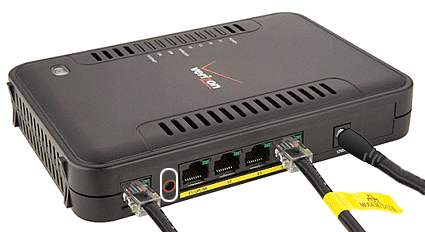
Some of you might have a spare Westell 7500, from Verizon, after changing address or service to a cable operator.
I did have one and decided not to pay extra for a wireless router from my new provider. Here is a how-to that allows the A90-750015
1. Get the manual, I will not go to ‘print screen detail’: http://www.westell.com/docs/support-documents/versalink_7500_user_guide.pdf?Status=Master
2. Connect to the Westell: http://192.168.1.1 and put default username (admin) and password (password)
3. I had to pass to a ‘create new password’ procedure, just do it.
4. Go to the screen “My network” – “Network Connections.
5. Click on “VersaPort”
6. On the first Drop In List choose “WAN uplink port”
7. On the second, select “Routed IP.
8. Click on the Enable bullet for “Proxy ARP”. Click Apply and wait a minute. The DSL light should stop blinking miserably. You are done with this sucker.
Now it is all about connecting your modem to the port E1 using a proper ethernet cable, power down and up both and wait for the result. If it worked for me I do not see way it should not work with you!
If it does works, please post your positive result! If it does not, well, look some place else how to do it and then post how you did it 
Thanks! This was a lifesaver. I was successfully able to use the modem as only a router